
Download Anatomy 2 – 2D Animation, Sprite Sheet, Sprite Animation
Overview
The Anatomy 2 app is a specialized desktop tool designed for creating 2D animated sprites and sprite sheets with efficiency and precision. At its core, the software enables users to build skeletal structures composed of interconnected bones, which serve as the foundation for character animation. This rigging approach allows for dynamic, fluid motion by manipulating bone positions, rotations, and sizes across individual frames. Each frame captures a unique configuration of the skeleton, enabling smooth transitions and lifelike movement. The tool is particularly effective for game developers and digital artists who require reusable character assets for 2D games.
By using a skeleton-based workflow, Anatomy 2 streamlines the animation process, reducing repetitive manual work. Users can quickly prototype animations and test different movements without redrawing frames from scratch. The software’s real-time rendering feature ensures that every adjustment to a bone is immediately reflected in a preview window, allowing for instant feedback during the creative process. This capability significantly enhances workflow efficiency and reduces iteration time.
Real-world applications include character animation for indie games, UI animations for mobile apps, and motion sequences for game cutscenes. The ability to swap textures on the same skeleton enables rapid creation of multiple character variations—such as different outfits, colors, or styles—without rebuilding the animation structure. This makes it ideal for developers working with limited resources or tight deadlines. The tool is especially valuable in collaborative environments where consistent animation quality and asset reusability are essential.
Key Features & Capabilities
- Skeleton-Based Animation System: Users create and manipulate a hierarchical bone structure to drive character movement. Each bone can be rotated, scaled, and repositioned independently, enabling natural motion such as walking, jumping, or waving.
- Real-Time Preview Rendering: Every change to a bone’s position or rotation is instantly rendered in a live preview, allowing users to see animation progress without waiting for playback or export.
- Texture Swapping for Rapid Variations: A single animated skeleton can be paired with multiple textures to generate different characters, outfits, or visual styles with minimal effort—ideal for creating diverse character sets.
- Automatic Sprite Sheet Generation: The software compiles all animation frames into a single sprite sheet, optimizing asset delivery and reducing file load times in game engines.
- Frame-by-Frame Animation Control: Each animation frame is defined by a unique bone configuration, giving users full control over timing, motion, and transitions between poses.
For example, a game developer can design a base walking cycle using a single skeleton, then apply different textures to create a warrior, a mage, and a rogue—all using the same animation data. This dramatically reduces production time and ensures visual consistency across characters. Similarly, an artist can experiment with motion paths and timing in real time, adjusting bone positions and immediately observing the impact on the animation.
User Interface, Workflow & Performance
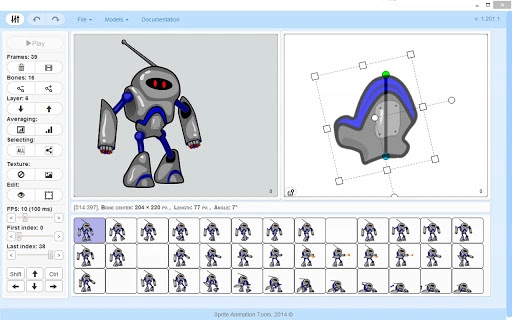
The user interface of Anatomy 2 is structured around a central workspace where the skeleton and preview are displayed. Navigation is primarily handled through a toolbar, timeline, and property panel, allowing users to manage bones, frames, and animation settings. The layout is intuitive, with clear visual cues for bone hierarchy, frame selection, and real-time rendering output.
Workflow efficiency is enhanced by the real-time rendering engine, which minimizes the need for constant playback and export cycles. Users can adjust bone positions frame by frame, with changes reflected instantly in the preview window. This reduces trial-and-error loops and accelerates the refinement process. The software supports keyboard shortcuts and drag-and-drop functionality for faster bone manipulation and frame management.
Performance details were not specified by the developer. However, based on general software behavior, the real-time rendering engine likely leverages GPU acceleration for smooth playback. The application’s responsiveness will depend on the complexity of the skeleton and the number of animation frames. The developer did not provide additional system requirements or resource usage metrics.
Compatibility & System Requirements
Anatomy 2 is designed for use on desktop platforms, though the specific operating systems were not listed. The software is available as a downloadable application, with a file size that was not disclosed. Installation size and hardware requirements are not provided by the developer.
Platform compatibility information is limited. Users should verify the official source for supported environments. The software may be compatible with Windows, Mac, or Linux, but this has not been confirmed. No mention of cloud-based or web-based versions was made. The developer did not specify whether the tool supports remote collaboration or team workflows.
Pros and Cons
Pros
- Real-time rendering for immediate feedback during animation
- Efficient skeleton-based workflow for reusable character animations
- Texture swapping allows rapid creation of character variations
- Automatic sprite sheet generation streamlines game asset delivery
- Free to download and use, making it accessible for beginners and indie developers
Cons
- Exact system requirements were not listed
- Compatibility with specific operating systems is unclear
- No information on advanced export formats or engine integration
- Limited details on collaborative or team-based features
- Performance behavior under heavy workloads not specified
FAQ Section
Is Anatomy 2 free to use?
Yes, Anatomy 2 is available at no cost. The software is offered as a free tool for creating 2D animated sprites and sprite sheets.
What operating systems does Anatomy 2 support?
The supported operating systems were not specified by the developer. Users should consult the official website for updated compatibility information.
Can I use Anatomy 2 for game development?
Yes, the software is designed with game development in mind, particularly for creating 2D character animations and optimized sprite sheets for use in game engines.
Does Anatomy 2 support integration with Unity or Unreal Engine?
Integration details were not provided. While the software generates sprite sheets suitable for game engines, specific import workflows or plugins for Unity or Unreal Engine are not confirmed.
Is the software safe to download and install?
Anatomy 2 is distributed as a standalone desktop application. As with any software, users should download from official sources to ensure security and avoid potential risks.
Final Thoughts + CTA
Anatomy 2 stands out as a powerful, accessible tool for 2D animation and game asset creation. Its skeleton-based system, real-time rendering, and automatic sprite sheet generation make it a valuable asset for indie developers, digital artists, and game designers. The ability to rapidly produce multiple character variations through texture swapping enhances productivity and creative flexibility.
While some technical details such as system requirements and platform compatibility remain unclear, the software’s core functionality is robust and well-suited for its intended purpose. For those seeking a free, efficient solution for 2D sprite animation, Anatomy 2 offers a compelling combination of features and usability.
Download Anatomy 2 now to begin creating dynamic 2D animations and optimized sprite sheets for your next game or project.







